
What the voice agent does
- Picks up new leads from Zoho CRM, Google Sheets or a direct webhook, and finds any that have not been called yet
- Normalises the lead’s details and checks how many times they have already been called, so nobody is called too often
- Places the call and holds a natural conversation in English and Hindi
- Checks your verified inventory during the call, so it only talks about what is actually available
- Checks your calendar and books the appointment or site visit while the person is still on the line
- Scores the lead after the call and writes the result, status and summary to Google Sheets and Zoho CRM
- Marks the visit confirmed automatically when the booking comes through Calendly
How the workflow is built
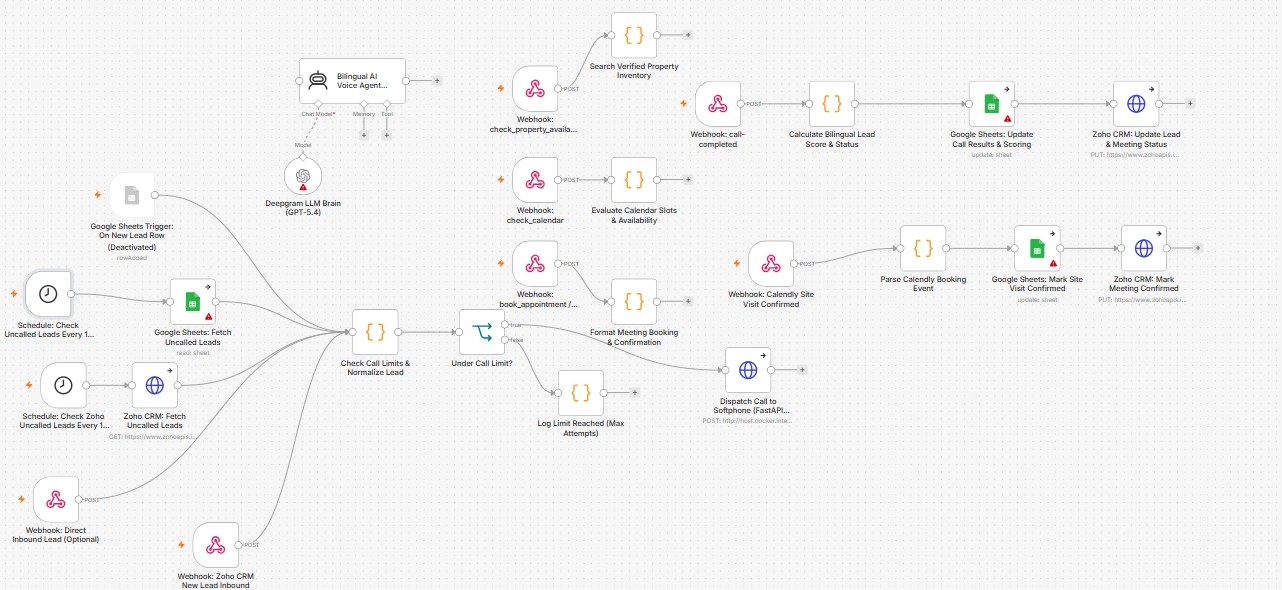
Every step runs in n8n, so you can see exactly what happens to each lead. The call limit check stops the agent from calling the same person again and again, and every call is logged.
- 01
Lead arrives
- New lead pushed from Zoho CRM
- Direct inbound lead webhook
- Scheduled checks for uncalled leads in Zoho and Google Sheets
- 02
Before calling
- Lead details normalised
- Call attempts checked against the limit
Under the limitCall placed through the softphoneLimit reachedLogged, no further calls - 03
During the call
- Bilingual AI voice agent talks to the lead
- Checks verified property inventory live
- Checks calendar availability
- Books the appointment
- 04
After the call
- Lead scored and given a status
- Call results written to Google Sheets
- Lead and meeting status updated in Zoho CRM
- 05
Visit confirmed
- Calendly booking received
- Site visit marked confirmed in Google Sheets and Zoho CRM
Redrawn from the n8n workflow behind the voice agent. Built for a property business; the same design works for any industry that books meetings or visits.
 View full size
Calling responsibly
The agent only calls people who have enquired with your business. It says it is an automated assistant when asked, respects a maximum number of call attempts, and hands anyone who wants a person to your team. Calling rules in India, including Do Not Disturb preferences and consent for recording, are configured with you before any call goes out.
Works alongside WhatsApp
Voice and WhatsApp work best together. A lead can get an instant WhatsApp reply, a call a few minutes later, and a WhatsApp confirmation after the visit is booked, all recorded in the same CRM.